It's your turn to pick up the kids today. You missed the text?
Carpool-Q has your back. Every family sees the same carpool schedule, and the driver gets a reminder before every pickup.



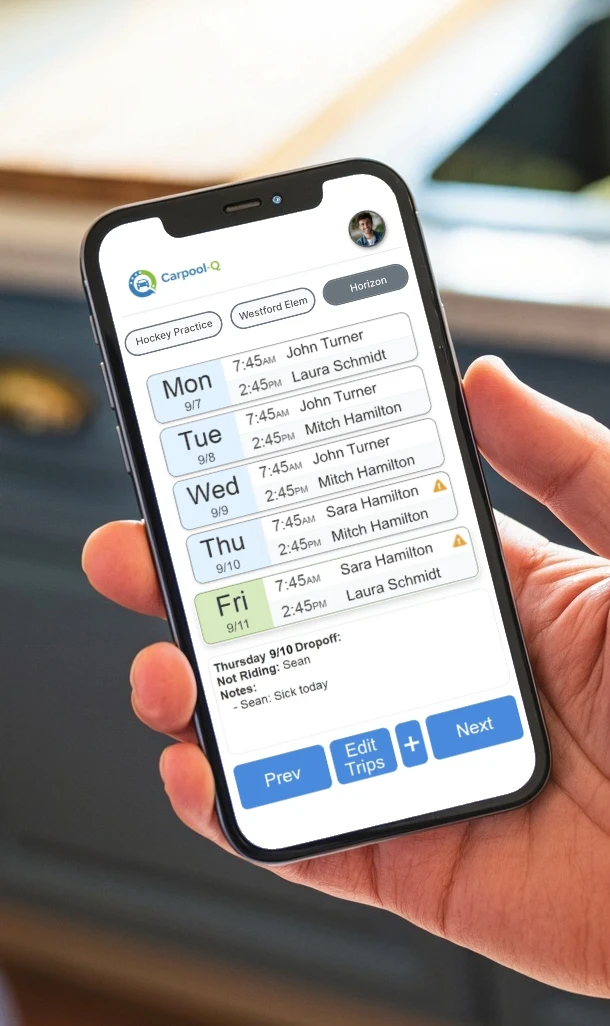
Carpool-Q has your back. Every family sees the same carpool schedule, and the driver gets a reminder before every pickup.
All features included from day one. No upsells, no locked tiers.
Everyone sees who's driving, every day. No guessing, no last-minute group texts.
Driver reminders, shortage alerts and a 6am summary on every day with a trip, weekends included.
Share your plan with one other family member who helps drive, plus your kids. Kids get view-only access.
Changes update instantly for everyone. No stale info, no crossed wires.
Invite families with one tap. They join your carpool with a simple code.
One person edits a trip at a time. Walk away mid-edit and it frees itself after 3 minutes.
Field trip Friday? Holiday Monday? One button adds the trip or takes the day off, and the driver hears about it.
New times for spring? See every change before it's saved, and undo it for 7 days.
Early release Wednesdays and late-start Fridays live inside the regular schedule.
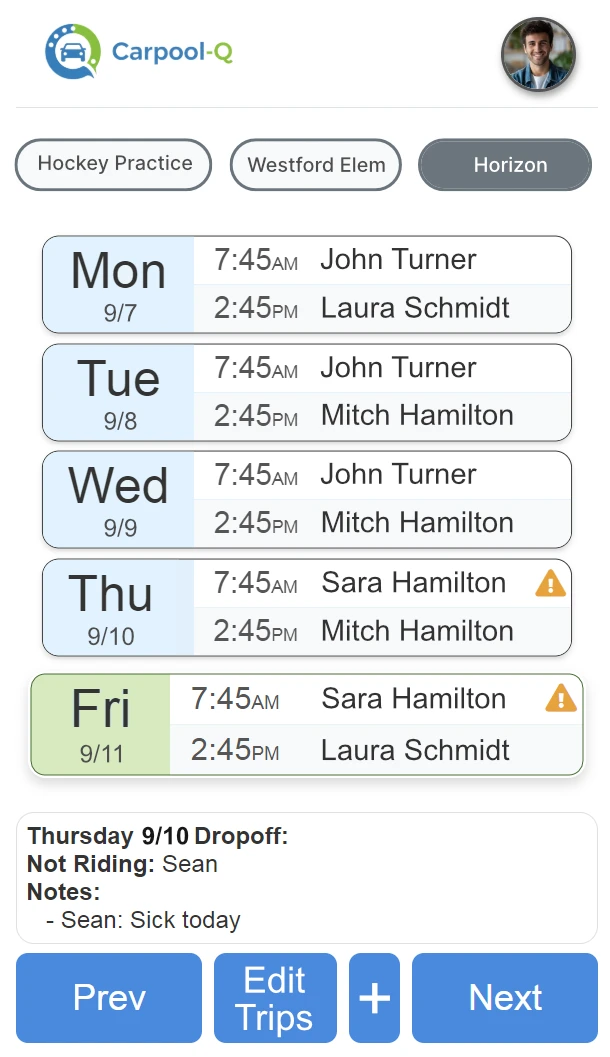
No more wondering who's driving tomorrow. The weekly view shows every driver, every time slot, every exception, all in one place.
Real feedback from real families.
The Carpool-Q app has been a game changer for how our families coordinate rides for school drop off and pick up. Before using it, we were constantly texting back and forth trying to figure out schedules, drivers, and last-minute changes. Now everything is organized in one place. Everyone can clearly see who is driving, pickup times, and any schedule updates without confusion. It has saved us so much time and reduced the stress of managing carpools each week. I would highly recommend it to any group trying to coordinate school pickups, sports practices, or extracurricular activities.
Really appreciate the ability to coordinate and organize seamlessly without 100 texts, especially with 4 different families!
Seriously though, that app was a game changer this year. We really appreciate the work you put into it!

School runs, sports practice, swim team: create as many carpools as you need and manage them from a single dashboard.
Three steps. Two minutes. Zero confusion.
Add your drivers, passengers, and weekly schedule. Done in minutes.
Share your invite code. Parents join instantly. No approval needed.
See the full week at a glance. Get reminders. Never miss a pickup.
The most affordable full-featured carpool app.
| Carpool-Q | Group Texts | Spreadsheets | Other Apps | |
|---|---|---|---|---|
| Price | $1.99/mo | Free | Free | $2.99–7.99/mo |
| No Carpool or Passenger Limits | ✓ | N/A | N/A | Free plans: 1 carpool |
| Shared Schedule | ✓ | — | Manual | ✓ |
| Phone Reminders | ✓ | — | — | Varies |
| Always Up to Date | ✓ | — | Slow | Varies |
| Family Accounts | ✓ | — | — | — |
One plan. Everything included. No surprises.
Carpool-Q is $1.99 a month. Every plan starts with a 14 day free trial.
The things worth knowing before you invite anyone.
You send a code, not a pitch. They can see your carpool's name, days and times before they create an account, so they know exactly what they are joining. Signing up takes about a minute, in a browser or from the app store. After that, if they allow notifications, their phone tells them when it is their turn to drive.
Share your 6-character invite code, or send an email invitation from the app. They can enter the code and see the carpool's name, days and times before creating an account. Signing up takes a name, an email and a password. There is no approval step and no waiting: they join instantly.
Every family in the carpool needs their own account, and every account starts with a 14-day free trial that does not ask for a card. After that it is $1.99 a month per household. One subscription covers one other family member who helps drive (a spouse, co-parent, grandparent, or teen driver) with full access, plus unlimited children with view-only access.
$1.99 a month per household, after a 14-day free trial. No card on the web or Android; on iPhone, Apple runs the trial and charges nothing until it ends. Everything is included at that price: unlimited carpools, push reminders, driver shortage alerts, daily summaries, family sharing. There are no tiers, no add-ons and no locked features. Cancel any time from Settings.
A group text has no schedule in it. You scroll to find out who is driving Thursday, and the answer changes three messages later. Carpool-Q keeps one schedule everyone sees, updates it for everyone at once, and reminds the driver before their turn. A spreadsheet is closer, but it does not tell anyone when the plan changes.
Carpool-Q notices and tells everyone. If a day has no driver assigned, it sends a shortage alert to the whole carpool at 10am and again at 6pm the day before, so somebody can volunteer while there is still time to sort it out. Nobody has to remember to check.
Only the families in that carpool. Access is enforced at the database, not just in the app, so nobody outside the carpool can read it. Someone holding your invite code sees the carpool name, days and times only: not your destination, not email addresses, not your children's names.
No. Carpool-Q runs in your phone's browser, and you can add it to your home screen so it opens like an app. If you prefer the store version, Carpool-Q is on the App Store and Google Play. The same account works on all three.
What we do with it, and what we do not do.
What Carpool-Q is not